
About
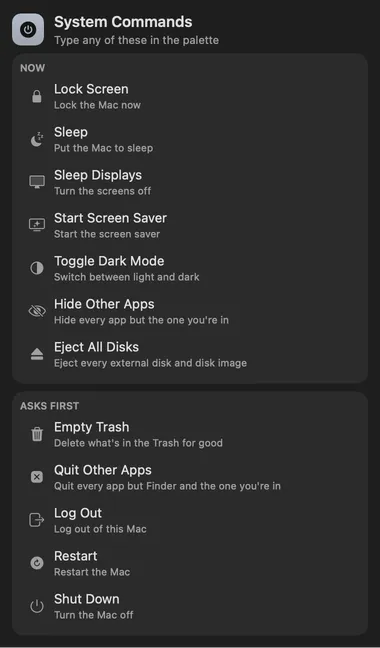
Lock, sleep, restart, empty the Trash or switch to dark mode from the command
palette, by name: type lock, sleep, empty trash or dark mode and press
Return. Restart, Shut Down, Log Out, Empty Trash and Quit Other Apps open a
second row that says what happens, so nothing is lost to a stray Return.
Give any of them an alias or a hotkey in Settings › Commands.
Gallery
Every place it shows up.
From anywhere
Run it without opening it.
system⌥ Space
- Lock ScreenSystem Commands
- SleepSystem Commands
- Sleep DisplaysSystem Commands
- Start Screen SaverSystem Commands
- Toggle Dark ModeSystem Commands
- Hide Other AppsSystem Commands
- Eject All DisksSystem Commands
- Empty TrashSystem Commands
- Quit Other AppsSystem Commands
- Log OutSystem Commands
- RestartSystem Commands
- Shut DownSystem Commands
Every command is in Stackbar's palette, and can have its own hotkey, a stackbar:// link, or a Shortcuts action.
Install
Two clicks in Stackbar.
- Open it in Stackbar, or open Stackbar → Settings → Store and find System Commands.
- Choose Install.
- It appears in your panel.
Don't have Stackbar yet? Download it free.
Or from a terminal
stackbarctl install --index https://navbytes.github.io/stackbar-plugins/index.json io.navbytes.stackbar.plugins.system-commands- Version
- 1.1.0
- Updated
- November 8, 2026
- Category
- System
- Shows in
- Panel
- Requires
- Stackbar 0.35.0 or later
- Publisher
- navbytes
- Bundle
- sha256 cd8d0d20e673…
Version history
What's new
1.1.0Latest
- Restart, Shut Down, Log Out and the other destructive commands ask through Stackbar, naming what they do.
- Stackbar 0.35.0 now asks for the second press itself, the same way in the panel, the palette and every window, and VoiceOver reads the question.
1.0.2
- When an action can't run (for example, Stackbar isn't allowed to control System Events, or there's no disk to eject), it now says why instead of doing nothing.
- Clicking a confirmation that has run out now tells you to click again within 10 seconds.
1.0.1
- Restart, Shut Down, Log Out, Empty Trash and Quit Other Apps in the panel forget their first click after 10 seconds, so a click out of habit later can't run one on its own.
1.0.0
- First release.
More system